4 min read
Boutique dashboard: 5 numbers to check each morning
Sales this month, orders waiting, new enquiries, low stock, best-sellers — the five-minute morning check that replaces running a boutique on gut feel.
Picture a boutique owner at a family dinner. Her uncle asks the question every self-employed person dreads: "So — how's business?" She says what most owners say: "Good, I think. Busy." She isn't being evasive. She genuinely doesn't know. She knows she stitched until eleven last night, that WhatsApp never stops, that the courier came twice this week. Busy is the only measurement she has.
The problem with "busy" is that it feels identical whether the month is your best ever or quietly sliding. Between festival seasons — when the shop isn't obviously full or obviously empty — most boutiques fly blind for months at a time, and only find out at Diwali whether the year worked.
"Busy" is a feeling, not a number
The fix is not accounting software, weekly reports, or a spreadsheet you'll abandon by Thursday. It's a short list of numbers, checked at the same time every day, each one tied to a single action. If a number can't change what you do this morning, it doesn't belong on the list.
The five numbers
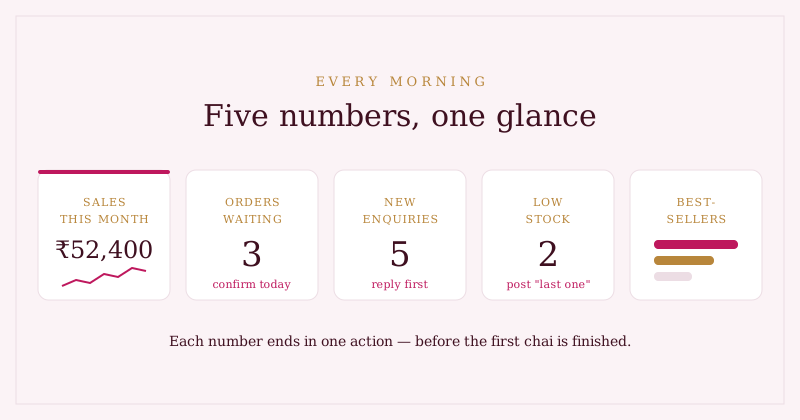
- Sales this month. Not revenue-with-caveats — actual recorded sales, month to date. This is the number that answers your uncle. Watched daily, it also tells you early when a month is soft, while there's still time to post, follow up, and push.
- Orders waiting. Every pending order is a customer who said yes and is now waiting to hear it back. This number should reach zero every single day — confirming an order takes one message and protects the sale.
- New enquiries. "Is this available?" has a shelf life of hours, not days. The WhatsApp playbook for boutiques goes deep on replying well; the dashboard's job is simpler — make sure nothing sits unanswered.
- Low stock. For one-of-one and few-of-a-kind pieces, stock isn't a warehouse count, it's a truth problem — the theme of from notebook to dashboard. A glance at what's down to the last piece tells you what to repost ("last one!") and what to reorder or restitch.
- Best-sellers. What actually sold in the last 30 days — not what got likes. This number decides what you photograph more of, what you cut, and what you stock deeper before the festive season.
A dashboard isn't a report card on the past. It's a to-do list wearing numbers: each figure should end in one action before your first chai is finished.
Make it a ritual, not a report
The reason dashboards fail isn't the numbers — it's the ceremony. If checking the business means opening a laptop, exporting something, or doing arithmetic, it happens once a month, guiltily. The ritual that survives is thirty seconds on the phone, before you open a single chat:
- Sales this month — on track, or push today?
- Orders waiting — confirm them, now, before anything else.
- New enquiries — reply before breakfast; speed is the whole game.
- Low stock — anything at one piece left? Post it as "last one".
- Best-sellers — is tomorrow's photoshoot of the right pieces?
Do this daily and something subtle happens: the numbers stop being a judgement and become boring, in the best way. You catch the soft week in the week itself. And the next time someone asks how business is going, you answer with a number, not a shrug.
Where Studio OS fits
The Studio OS dashboard is built to be exactly this morning glance — one screen, no exports, no arithmetic:
- Sales this month sits at the top with a 14-day trend, updated the moment an order completes or a manual sale is recorded.
- Orders waiting and new enquiries are live tiles — tap one and you're on that list, confirming and replying, not just observing.
- Best-sellers shows the last 30 days as simple bars, from real recorded sales rather than likes.
- Stock is one tap away on your products list, editable inline — and it decrements automatically when you complete an order, so the low-stock glance stays honest.
- A follow-ups due card surfaces the customers you promised to get back to, right beside the numbers.
It's free in early access, no card needed. See the customer side of those numbers in the demo shop, or start your own morning ritual from Studio OS.