4 min read
Order management for boutiques, in three stages
Chats make terrible order books. A simple pending → confirmed → completed pipeline keeps every order visible and records the sale when you close one.
Picture a Sunday night. The boutique owner is on the sofa, phone in hand, scrolling upward through WhatsApp trying to reconstruct her week. The peach anarkali — confirmed on Thursday, she's fairly sure. The Banarasi saree — the customer said "90% yes" and then went quiet. The kurta set — paid for, but has it been marked anywhere? She counts orders on her fingers, loses count, starts again from the top of the chat list.
Nothing has gone wrong, exactly. Every one of those orders is somewhere. The problem is that "somewhere" is thirty conversations deep, and the only index is her memory. That works at five orders a month. It quietly breaks at twenty-five.
An order is a state, not a chat
The fix starts with a small mental shift: the conversation and the order are two different things. The chat is where the relationship lives — the questions, the reassurance, the payment screenshot. The order is a fact with a state: has this been agreed, and has it been delivered and paid? A chat can hold that fact, but it can't show you all of them at once, and it will never tell you "three orders are still waiting on you."
The moment an order is agreed, it should exist somewhere that isn't a chat — the same rule we push in the WhatsApp playbook for boutique owners. The question is what that somewhere should look like.
Three stages are enough
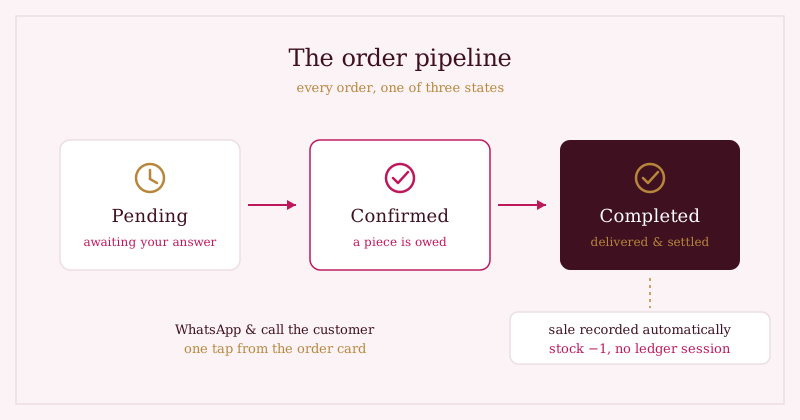
Big e-commerce systems track a dozen statuses — picked, packed, manifested, in transit. A boutique needs three:
- Pending — the request has arrived, but you haven't committed. This is your to-answer list, not your to-sew list.
- Confirmed — you've said yes. You now owe a piece; she now owes a payment. Everything on this list is real work and real money.
- Completed — delivered and settled. Done means done.
(Cancelled exists too, but it's an exit, not a stage.) The discipline is in having few states. Ten statuses get abandoned by February; three get used, because moving an order takes one tap and the answer to "which stage is this in?" is never ambiguous.
The close should do the bookkeeping
Here's where most systems — including the notebook — fall short. Marking an order "completed" is usually the start of paperwork: write the sale in the ledger, knock one off the stock count, remember to check the monthly total. Each step is small; each step gets skipped on a busy day; the ledger drifts from reality.
An order isn't really closed until the sale is written down and the stock count moves. If those are separate chores, they're the chores that get skipped — so they shouldn't be chores at all.
The pipeline earns its keep when completing an order is the bookkeeping: one tap records the sale and reduces the stock count in the same motion. No drift, no Sunday-night reconciliation. If you've read how a boutique's inventory moves from notebook to dashboard, this is the other half of that story — orders are where stock actually leaves.
Keep the conversation one tap away
None of this replaces the chat — it protects it. The order card should carry the customer's number, so confirming an order opens WhatsApp with the message already drafted, and a delivery-day call is one tap from the same screen. You still talk to every customer personally. You just stop being the database while you do it.
Where we're taking this next: we'd like orders to carry more of the delivery story — expected dates and courier notes on the card — so "when will it reach?" has an answer in the same place as everything else.
Where Studio OS fits
Studio OS gives every boutique this pipeline out of the box:
- Order requests from your shop page arrive as pending, with the piece, size and price attached — read from your catalogue, not typed by hand.
- One tap moves an order to confirmed, and opens WhatsApp with the confirmation drafted — you press send, always.
- Completing an order records the sale and reduces stock automatically, so your dashboard's monthly total is right without a ledger session.
- WhatsApp and call buttons live on the order itself — the conversation is never more than a tap from the record.
See the customer's side of an order request on the demo shop — then imagine your Sunday nights without the scroll.