4 min read
Professional invoices without accounting software
Handwritten bills undermine premium pieces. How boutiques can send clean, professional invoices from their orders — without buying accounting software.
Picture the handover of a ₹14,000 bridal lehenga. Months of conversation, two fittings, hand embroidery a machine couldn't repeat. The piece comes out in tissue paper. And then the bill arrives: a page torn from a duplicate book, the total underlined twice in ballpoint, the shop's name from a rubber stamp that's running out of ink.
The customer says nothing, of course. But something in the transaction just shrank. A premium piece deserves a premium paper trail — and the gap between the two is where a boutique quietly loses a little of the trust it worked so hard to build.
Why boutiques skip proper invoices
Not laziness — friction. Accounting software is built for accountants: chart of accounts, ledgers, a setup wizard that asks about depreciation before it lets you bill anyone. For a boutique that runs on WhatsApp and a notebook, that's a monthly fee for a tool that fights you. So the duplicate book survives, because it's there.
But the duplicate book has real costs beyond the impression it makes. There's no copy the customer can find again in six months. There's no searchable record on your side when someone asks "what did I pay for the silk set?". And when a boutique starts supplying to a store or a stylist who needs a proper bill, the scramble begins.
What an invoice actually has to do
Strip away the accounting theatre and an invoice has four jobs:
- Identify the shop — your name, your logo, how to reach you. This is branding as much as bookkeeping.
- Identify the sale — what was bought, at what price, with any discount shown honestly rather than mumbled.
- State the money — the total, what's been paid, what's due. For made-to-order work with an advance, this line does a lot of quiet work.
- Be shareable — it has to reach the customer where she is, which for a boutique means WhatsApp, not a printer tray.
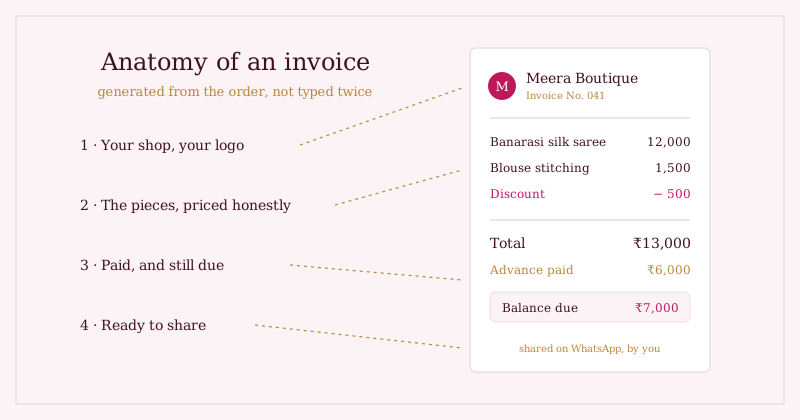
Notice what's not on the list: double-entry ledgers, inventory reconciliation, a finance module. If your orders are already recorded — the way a three-stage order pipeline records them — then everything an invoice needs already exists. The invoice should fall out of the order, not be typed a second time.
The invoice is the last thing your customer sees in a sale. It's strange that we agonise over the packaging and then hand over a bill that looks like a parking receipt.
The one-tap standard
The test for whether invoicing will actually happen in a busy boutique: can you produce one in the time it takes the customer to find her keys? If generating the bill means opening another app, re-typing the piece name and recalculating the discount, it won't survive a festival-season rush. If it's one tap from the order — details already filled, ready to share on WhatsApp — it becomes as automatic as saying thank you.
That's the standard worth holding out for, whatever tool you use. Enter the sale once. Everything downstream — the record, the stock change, the bill — should be generated, not re-typed.
Where we're taking this next: GST fields for boutiques that need them, and richer PDF styling so the invoice can carry as much of your brand as the box does.
Where Studio OS fits
Studio OS treats the invoice as a natural product of the order, not a separate chore:
- Invoices are generated from your orders and sales — piece, price, discount and customer details are already there, so nothing is typed twice.
- Your boutique's name and logo sit at the top, the same branding your shop page carries.
- Each invoice is shareable — send it to the customer on WhatsApp the way you send everything else. As always, you press send; Studio OS never messages your customers itself.
- Because invoices hang off real orders, the answer to "what did she pay in March?" is a lookup, not an excavation.
Browse the demo shop to see where an order — and its paper trail — begins, or start with Studio OS and retire the duplicate book.